3D Visualizations Don’t Quite Do the Job…
Computer-generated 3D visualizations have been with us for nearly 20 years — they serve as an important component in real estate marketing and sales, as well as a helpful tool in the architectural design process.
While years ago visualizations looked schematic and dull, today it’s hard to tell apart a visualization from a photograph.
But even a visualization, as beautiful as it may be, has one very significant drawback:
It is displayed in only two dimensions.
The goal of a visualization is to illustrate a three-dimensional structure or space, but conventional media — whether paper, a computer screen, or a television — can only display a “flat” two-dimensional image.
And that’s a problem.
Every architect or visualization studio is familiar with the phenomenon:
The client looks at a realistic visualization that accurately and faithfully depicts the home’s interior space, yet still struggles to grasp the space and understand exactly how the home will look.
This is completely understandable: we’re used to perceiving space by looking around with our eyes, not by staring at images…
A visualization shows only a narrow angle of the overall space, and it isn’t always easy to put two and two together and understand the volumes of a space just from looking at visualizations.
The Solution: Virtual Reality
In the past two to three years, there has been an amazing breakthrough in virtual reality that can really solve the challenges of illustrating architectural structures.
Let’s bring a little order to what’s happening in the market (very briefly, and as non-technical as possible).
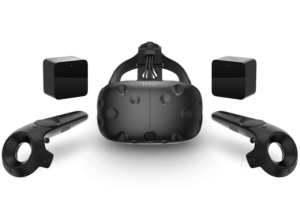
There are “real” virtual reality headsets like the HTC Vive or Oculus Rift that provide the best 3D experience. As of today, of course. In a few years they’ll probably look like museum exhibits to us…
The concept works like this: you wear a headset that contains a small display (actually two — one for each eye) and motion and rotation sensors. All of this connects to a computer that streams the data to the display.
Because this solution is based on a powerful computer, it can display high-quality 3D models in real time.
It’s an excellent solution, and I recommend everyone experience it, but it’s far from accessible in terms of price.
The headset itself costs around 5,000 NIS, and a sufficiently powerful computer will cost a similar amount, so you easily exceed 10,000 NIS.
The cost of producing a virtual tour that allows you to walk through a 3D home is also high — we’re talking tens of thousands of shekels. The reason is that beyond building the planned space in 3D, you also need to perform optimization to enable the model to run in VR headsets.
This whole process requires a great deal of work, which naturally reflects in the price.
Of course, there are luxury real estate projects that can easily absorb these costs to provide their clients with a unique VR experience, but it’s not suitable for every project.
It’s worth adding that within a few years, prices will likely become much more accessible. Equipment costs will drop once serious competitors enter the market (a process already underway with the Windows Mixed Reality platform), and the model-building process will become simpler as the field develops.
The question is whether there’s a VR solution that’s suitable for projects with a limited budget.
Not surprisingly, the answer is yes, but…
Let’s start with the “yes,” and then move on to the “but.”
The idea, in brief: smartphone-based VR headsets + stereoscopic panoramic visualizations = a VR experience on a low budget.
Google’s VR Revolution
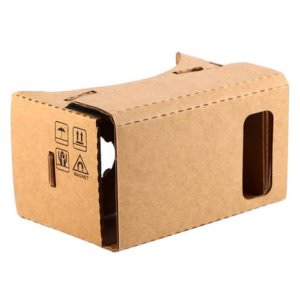
The solution I’d like to propose is based on a combination of panoramic visualization and simple VR headsets that work on the Google Cardboard principle.
If you’re wondering what Google Cardboard is, here’s a quick overview:
In 2014, Google realized something — essentially, each of us carries in our pocket the three components needed to create a virtual reality experience: a computer, a display, and motion sensors.
Or in one word: smartphone.
So instead of buying expensive headsets connected to an expensive computer, you can simply place a smartphone inside simple goggles and get the same experience (well, not exactly the same experience, but hey, it’s almost free!).
To take the principle of simplicity to its logical conclusion, Google made their headset out of brown cardboard and two simple lenses and called it… well, Cardboard.
Since then, dozens or hundreds of companies have taken the idea and tried to push it a step forward —
Instead of cardboard, you can use plastic, add some padding for comfort, and perhaps improve the lens quality.
At the end of the day, there are now tons of VR goggles available for around $15.
(Side note: there have also been attempts to take the Google Cardboard concept two steps further and externalize the motion sensors. This is essentially what Samsung did with the Gear VR and Google did with the Daydream. Currently these headsets are compatible with a limited range of devices, which in my opinion is a serious limitation.)
How Can This Be Applied to Architectural Space Visualization?
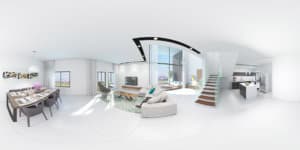
A panoramic image is one that displays 360 degrees of the space in a single image. You can photograph an existing location with a camera, and you can also produce such a visualization.
Now, on its own, as it’s displayed, this type of visualization isn’t very helpful — it’s distorted and hard to understand what’s going on.
But there are applications that can take this image and display it on a computer screen or smartphone in a much friendlier and more pleasant way — one that lets you “rotate” 360 degrees using your finger or mouse.
Already at this stage, you can run the panoramic visualization on a smartphone placed inside VR goggles and get a certain sense of three-dimensional space.
But it’s recommended to go one step further and produce a stereoscopic panoramic visualization.
Stereo…What???
There are quite a few factors that cause our brain to perceive space as three-dimensional and understand depth: perspective, shading, and more.
But one of the most significant is the distance between our two eyes (approximately 6 cm).
Because of the distance between our eyes, each eye sees a slightly different image. The farther away an object is, the more similar the images received by both eyes will be; the closer the object, the more different the images will be.
You can do a simple experiment — look at your finger with one eye closed, then switch between eyes.
In short, the brain analyzes the gap between the images received by each eye and draws conclusions about the distance between the eye and the object.
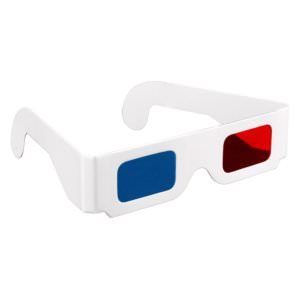
Over a hundred years ago, films began to be produced using a technique that “tricks” the brain — two images were projected on top of each other — one with a red filter and the other with a cyan filter. Meanwhile, viewers wore glasses with matching colored filters so that each eye would see a slightly different image, creating the 3D effect.
We’re all familiar with those glasses.
The technology has evolved, and today there are glasses that separate the images without tinting the lenses, using a polarizer filter instead.
In VR headsets, separating the images received by each eye is much simpler:
The headset itself has a physical divider that separates the eyes. Additionally, the smartphone display shows two images side by side, so each eye sees a slightly different image.
The result is a convincing three-dimensional experience.
You don’t have to stop at a single panoramic image. You can produce images from several viewpoints in the space and allow transitions between them. It’s not quite “walking” through the home, but it comes close…
VR Virtual Tour — What’s Good About It?

There are several advantages to using this technique for VR visualizations.
The first obvious advantage is price — the equipment cost is negligible, and the cost of producing the visualizations is not significantly higher than producing standard interior visualizations, which are already needed for almost every project.
The second advantage is accessibility — the panoramic visualization can be easily uploaded to the internet, so anyone can view it from their smartphone even after leaving the sales office, the design firm, or their own home.
If you really want to go all out, you can distribute branded Cardboard headsets at trade shows or sales offices — even Pepsi uses Cardboard!
But…
There are also drawbacks.
First, the optics in these headsets aren’t very high quality, which affects the image quality.
Additionally, keep in mind that image quality depends on the smartphone’s display quality, so if you’re using screens with low resolution, the image will look pixelated. This is a problem that can be solved relatively easily — simply use devices with high resolution (QHD).
Another downside: in expensive VR devices, the graphics processor is in the computer nearby, allowing a very high frame refresh rate — about 90 frames per second. The processor inside a smartphone is significantly weaker, so the frame refresh rate will be much lower. This means that when you move your head to look left and right, the image will lag slightly behind.
And that’s a serious problem.
Our brain doesn’t like being fooled, and the moment it detects a gap between movement and the image, it senses something is wrong, and the body may react with dizziness and nausea.
To overcome this, it’s important to follow a few rules:
-
Use the most advanced device available. The more powerful the smartphone’s processor, the faster and smoother the motion will be.
-
Hold the headset in your hands — don’t use straps! This is an explicit instruction from Google, and the logic is quite simple: the rotation speed of our head is significantly higher than the rotation speed of our shoulders. When we’re forced to hold the headset in our hands, we effectively limit the rotation speed and significantly reduce the risk of experiencing dizziness.
-
It’s better to sit than to stand. A swivel chair can be useful in this regard, as it allows you to look in all directions without needing to stand.
One last thing — remember that unlike more expensive VR solutions, with a smartphone you don’t actually have all the 3D data of the space, just a panoramic image.
This means you can’t freely walk around the space and “stand” wherever you want, but only at predefined viewpoints (you can switch between viewpoints, of course).
Additionally, there’s no ability to move furniture, change colors and materials — something that is certainly possible with more advanced VR solutions.
In Summary
To sum up, the field of virtual reality is developing very rapidly, and within a few years, VR visualizations will likely be accessible to almost every project.
Until then, for projects with a limited budget, you can make do with stereoscopic panoramic visualizations running on VR headsets — from our experience, it works wonderfully.
Want to learn more about VR visualizations for your project? Contact us and we’ll be happy to tell you more.